

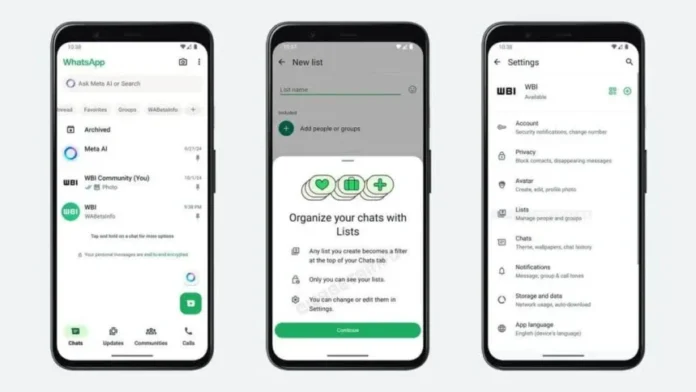

WhatsApp doesn’t natively support custom folders, but you can manually organize chats using labels, favorites, and archiving. Here’s how to create a structured system for your messages.
📌 Method 1: Use WhatsApp’s Built-In Tools
1️⃣ Pin Important Chats (Quick Access)
- Best for: Frequently used chats (family, work groups).
- Steps:
- Long-press a chat.
- Tap Pin (📌).
- Pinned chats stay at the top (max 3-5 chats).
2️⃣ Archive Less Important Chats
- Best for: Hiding inactive chats without deleting them.
- Steps:
- Swipe left on a chat > Archive.
- To view archived chats, scroll to the bottom of your chat list.
3️⃣ Starred Messages (For Key Info)
- Best for: Saving important texts, links, or media.
- Steps:
- Long-press a message > Tap Star (⭐).
- Find all starred messages in Settings > Starred Messages.
📂 Method 2: Create Custom Lists with Labels (Workaround)
Since WhatsApp doesn’t have folders, use emoji + chat names for visual sorting.
1️⃣ Rename Chats with Emoji Labels
- Example:
- 👨👩👧 Family → “👨👩👧 Mom”
- 💼 Work → “💼 HR Team”
- Steps:
- Open a chat > Tap the contact/group name.
- Tap Edit (✏️) > Add an emoji prefix > Save.
2️⃣ Use WhatsApp Web/Desktop for Drag & Drop
- On web.whatsapp.com, you can manually drag chats to reorder them.
📲 Method 3: Third-Party Apps (Advanced Sorting)
| App | Function |
|---|---|
| Chat Organizer for WA | Auto-sorts chats into tabs (Work, Personal) |
| WA Business | Labels for customer chats (Android only) |
⚠️ Warning: Avoid apps requiring WhatsApp login—use only trusted tools.
💡 Pro Tips for Better Organization
✔ Use search (Tap 🔍) to find old chats fast.
✔ Mute noisy groups (Long-press > Mute).
✔ Backup chats (Settings > Chats > Chat Backup) before reorganizing.
❓ FAQ: WhatsApp Chat Organization
Q: Can I create folders like in Gmail?
A: ❌ No, but emoji labels + pinning work similarly.
Q: Do archived chats reappear when new messages arrive?
A: ✅ Yes—unless you enable “Keep Chats Archived” (Settings > Chats).
Q: Can I sort chats alphabetically?
A: ❌ No, but pinned chats stay on top.
🔗 Related Guides
📢 Found this helpful? Share with friends who need chat organization tips!
#WhatsAppTips #ChatOrganization #ProductivityHacks